
entryText
$0.52
audio incl.
New · 5–15 seconds · Up to 4K · Native stereo audio
Create 5–15-second videos from text, start and end frames, or image, video and audio references, with output up to 4K and native stereo audio.
Use one MiniMax H3 engine for text-to-video, image-to-video and reference-to-video. Choose the duration and resolution, then direct character continuity, motion, camera and sound in one workflow.
Real MiniMax H3 render
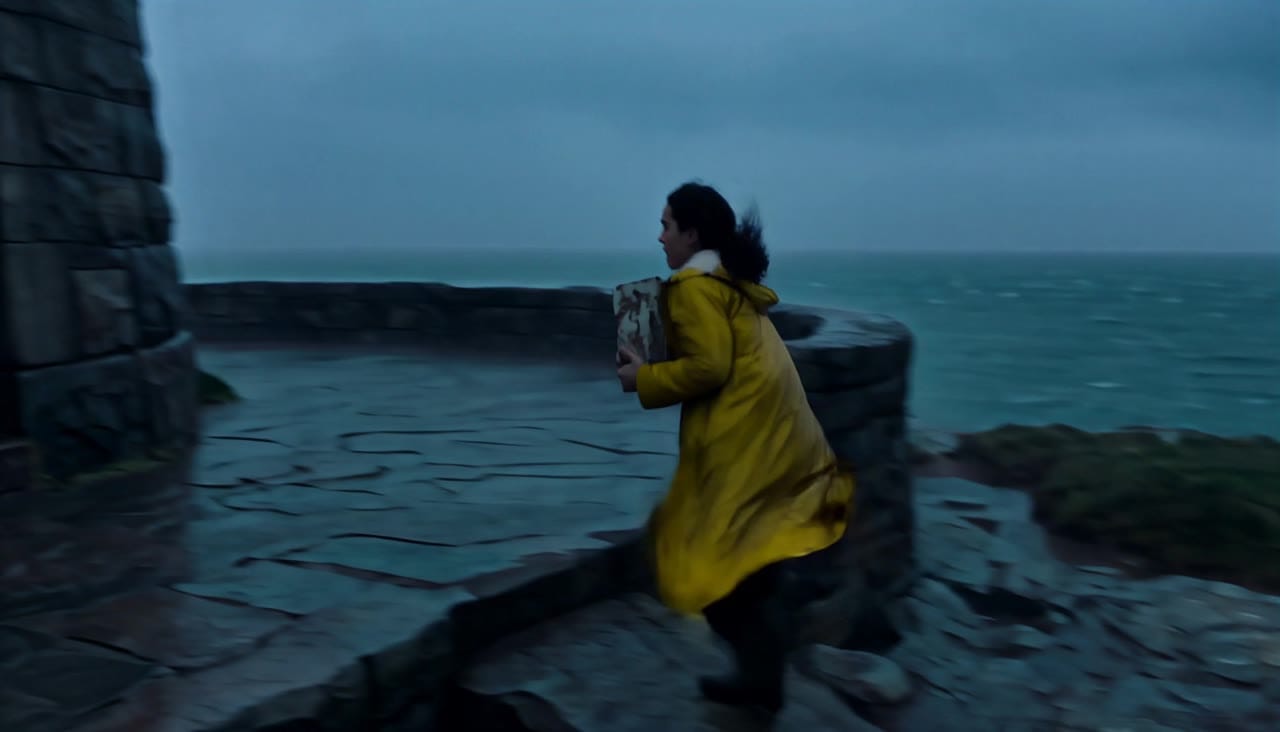
Elara races through a storm to relight a lighthouse and guide a lifeboat home
Three creation workflows
Move between text-to-video, image-to-video and reference-to-video inside one H3 engine.
5–15 seconds at up to 4K
Choose any whole-second duration and render at 768P, 2K or 4K at 24 FPS.
Multimodal reference direction
Combine image, video and audio references to guide identity, performance, motion and sound.
Native stereo audio
Generate ambience, effects, music or speech with the picture in the same render.
Choose workflow, duration, resolution and references, then review the exact price before rendering.
$0.52
audio incl.
$1.69
Most popularaudio incl.
$3.12
audio incl.
$2.11
audio incl.
The first five reference images are included; each additional reference image adds its displayed surcharge.
Review accepted MaxVideoAI renders that test character continuity, camera direction, reference control and synchronized sound.
Inspect face, wardrobe and performance across the full sequence.
Follow framing, camera movement and transitions from beat to beat.
Compare the intended identity, movement and sound with the final video.
Evaluate dialogue timing, ambience and synchronized effects.
Every example on this page is generated through MaxVideoAI.
Use text-to-video and choose Auto or a fixed aspect ratio for a complete shot from one prompt.
Animate one start image and add an optional end image; H3 follows the source framing automatically.
Use reference mode to assign identity, wardrobe, motion and voice cues across the scene.
Build the prompt in three passes: define the performance, direct the shot sequence, then lock continuity and sound.
Source: MiniMax H3 guide
Describe the character, action, setting, camera and sound, then choose a fixed ratio or Auto.
Upload a start image and optionally an end image; the output follows the source aspect ratio.
Combine up to 9 images, 3 videos and 3 audio clips while staying within 12 unique references.
Write dialogue, ambience and synchronized sound cues directly into the scene prompt.
Establish identity, expression, body language and the visible change in the scene.
Character:
[Appearance, wardrobe, expression and voice]

Setting:
[Location, time, weather and visual anchors]

Action:
[One clear physical action and reaction]

Sound:
[Dialogue, ambience and synchronized effects]
Subject: Elara, a lighthouse keeper in a mustard raincoat • Action: Races up the tower, powers the lens and calls a lifeboat home
Camera: Handheld exterior tracking, stairwell close follow, lantern-room orbit and aerial pullback • Style: Storm-lit cinematic naturalism at blue hour
2K render: 15-second 2K multi-shot scene with native stereo dialogue
Create a 15-second cinematic 16:9 film with native multi-shot continuity and native stereo sound. Original fictional character: ELARA, a 34-year-old lighthouse keeper with wind-burned olive skin, dark wavy hair tied back, a weathered mustard raincoat, charcoal sweater, and practical sea boots. Keep her face, clothing, and proportions consistent in every shot. 0.0–3.5 seconds: wide exterior at blue hour, a stone lighthouse on a violent Atlantic cliff, rain sweeping sideways, Elara runs toward the tower carrying a small weathered signal case; handheld tracking camera, realistic wet fabric and foot contact. 3.5–7.5 seconds: interior spiral stairwell, medium close tracking shot as she climbs fast, breath visible, one hand gripping the rail, practical amber lamps, no cuts that break identity. 7.5–11.5 seconds: lantern room, she reaches the controls and throws the emergency lever; orbit from her determined face to the huge Fresnel lens as it powers on. At 10.5 seconds Elara says clearly, with natural lip sync: “Harbor light is alive. Bring them home.” 11.5–15.0 seconds: exterior aerial pullback as the rescue beam sweeps across black waves and reveals a distant lifeboat turning toward safety. Audio: native stereo only—storm wind outside, rain on glass, boots on iron stairs, strained breathing, lever clunk, electrical rise, deep lighthouse mechanism, distant surf, and Elara's exact spoken line. No music. No subtitles, captions, on-screen text, logos, watermarks, beauty-ad framing, or product pack shot. Photorealistic skin and motion, coherent hands, restrained cinematic contrast.
Best practices, common fixes, and important limitations to help you get the strongest results with H3.
These side-by-side comparisons break down price, resolution, audio, speed, and motion style so you can pick the right engine fast.
Each page includes real outputs and practical best-use cases.
Seedance 2.5 video generation workflows on MaxVideoAI.
Compare H3 vs Seedance 2.5 →Use Kling 3.0 Omni Pro for reference-guided Kling video, storyboard images, @Image prompt anchors, optional start/end frames, video-to-video, and native audio.
Compare H3 vs Kling 3.0 Omni Pro →Generate cinematic Veo 3.1 videos with text prompts, start-image animation, multi-reference guidance, optional last-frame control, and extend workflows in one unified MaxVideoAI model page.
Compare H3 vs Google Veo 3.1 →The limits that shape your renders.
Built-in safeguards and best practices for responsible creation with H3.
Use a text prompt, a start image with an optional end image, or a reference set containing images, videos and audio. Audio references must accompany at least one image or video reference.
Choose any whole-second duration from 5 through 15 seconds and render at 768P, 2K or 4K at 24 FPS.
Reference mode accepts up to 9 images, 3 videos and 3 audio clips, with no more than 12 unique references in one request.
Yes. H3 produces native stereo audio with the video; there is no separate audio switch.
Yes. MiniMax H3 is available in MaxVideoAI, and the exact price is shown before every render.
