
Seedance 2.0 FPV drone flight path map-to-video example
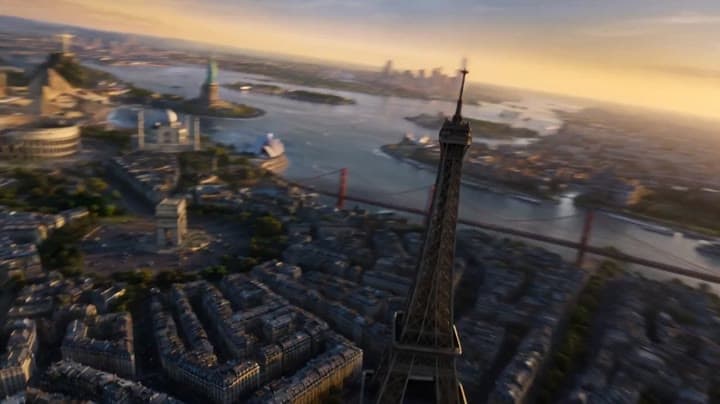
This Seedance 2.0 text-to-video with visual reference example turns a drawn route on a surreal landmark map into a cinematic FPV drone flythrough. The sequence follows a planned camera path through a mega-city filled with famous monument-inspired architecture, using smooth banking turns, altitude changes, strong parallax and continuous forward motion. Use it as a reference for AI camera path prompts, FPV drone video examples, route-guided camera movement and map-to-video style workflows.
Storyboard inputs
Visual workflow context
Editorial notes for the source images and visual reference workflow.
This map-to-video camera workflow uses a reference image with a drawn route as the main visual planning input. The map defines the environment layout, landmark positions and intended FPV flight path, while the prompt explains that the red route is guidance only and must not appea...Show full contextHide full context
This map-to-video camera workflow uses a reference image with a drawn route as the main visual planning input. The map defines the environment layout, landmark positions and intended FPV flight path, while the prompt explains that the red route is guidance only and must not appear in the final video. Seedance 2.0 turns that visual plan into a cinematic drone flythrough with continuous forward motion, smooth banking turns, altitude changes, landmark parallax and audio. This example demonstrates how a reference map or annotated storyboard can guide an AI video model toward a more controlled camera path than a standard text-to-video prompt.
Workflow
Reference to video
Camera
Drone
Output
12s · 16:9 · 720p
Recorded render cost
$4.48
Audio
Enabled
Constraints
Reference To Video, Audio Enabled, Reference Images
Reference images
1
Prompt improvement notes
Note 1
Keep the subject, camera move, lighting, duration, aspect ratio and audio requirement grouped so the render has one clear production brief.
Note 2
Change one variable at a time when cloning this prompt: model, duration, camera motion or reference input. That makes quality and price differences easier to compare.
Note 3
Add a short negative prompt if you need to block text overlays, logos, distorted hands, face warping or unwanted camera shake.
Compare this model
Review this example beside nearby engines before choosing a render path.
Why Seedance 2.0 fits this shot
Seedance 2.0 by ByteDance: cinematic AI video with native audio, realistic physics, director-level camera control, 480p/720p/1080p/4K output, and text, image, and reference workflows.
Image input
Audio option
Motion controls
Key frames

Related examples
View all examples Seedance 2.0
Seedance 2.0 action chase camera path example with map reference
This Seedance 2.0 text-to-video with map reference example uses an escape route image to guide a cinematic action chase sequence. The video follows a planned route through an urban environment with fast vehicle motion, helicopter pursuit energy, camera path control, dramatic pacing and native audio. Use it as a reference for AI action movie prompts, route-guided camera movement, chase scene planning and map-to-video style workflows.
 Seedance 2.0
Seedance 2.0 cinematic museum heist video prompt example
This Seedance 2.0 text-to-video with audio example turns a detailed cinematic heist prompt into a suspenseful museum vault sequence. The scene follows a master thief inside a private museum environment, using dramatic lighting, stealth action, camera movement and tense audio to create a polished short-form action concept. Use it as a reference for AI heist scenes, cinematic prompt writing, character-driven action videos and suspenseful Seedance video examples.
 Google Veo 3.1 Fast
Veo 3.1 Fast FPV apartment commercial example
This Veo 3.1 Fast example uses an FPV-style camera move to reveal a staged apartment commercial with sound and polished lighting.
 Kling 3 Pro
Kling 3 Pro futuristic city drone flythrough example
This Kling 3 Pro example demonstrates a futuristic city flythrough with continuous drone-style motion and a seamless interior transition.